How code-explore Combines Fulltext and Semantic Search
You have 200 projects on your machine. You vaguely remember building something with “JWT authentication” last year. How do you find it?
Fulltext search would match the literal string “JWT” in project names, READMEs, and summaries. But what if you wrote “token-based auth” instead? Semantic search understands that these mean the same thing — but it can miss exact matches that fulltext catches trivially.
code-explore doesn’t choose. It runs both and fuses the results.
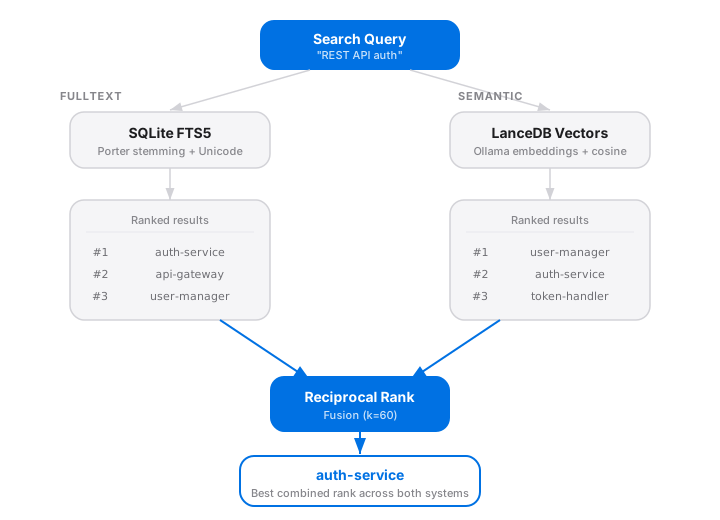
The Two Search Engines
SQLite FTS5 — Fast and Literal
Every project gets indexed into a SQLite FTS5 virtual table:
CREATE VIRTUAL TABLE projects_fts USING fts5(
  name, summary, tags, readme_snippet,
  tokenize='porter unicode61'
);
Porter stemming means “authentication” matches “authenticating”. Unicode 6.1 tokenization handles non-ASCII characters. This runs instantly, offline, with zero dependencies.
LanceDB — Semantic and Multilingual
During indexing, code-explore generates embeddings for each project via a local Ollama model. These vectors live in a LanceDB table and support cosine similarity search.
The key advantage: semantic search understands meaning. A query for “REST API with user management” will find a project described as “HTTP backend with CRUD endpoints for accounts” — even though they share zero keywords.
Reciprocal Rank Fusion
Running two searches gives you two ranked lists. The question is: how do you merge them?
code-explore uses Reciprocal Rank Fusion (RRF), a method that’s simple, effective, and doesn’t require tuning weights between the two systems.
The formula:
score(result) = Σ 1 / (k + rank + 1)
For each result, sum the reciprocal of its rank in each list, offset by a constant k (default: 60). Results that appear high in both lists get the best scores. Results that rank well in only one system still surface, but lower.
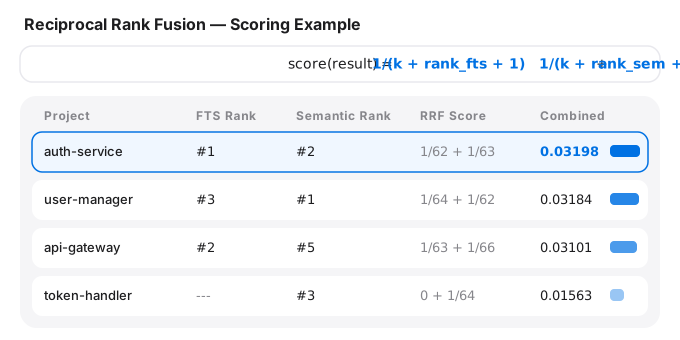
Why RRF over a weighted average?
- No calibration needed — fulltext and semantic scores are on completely different scales. RRF only uses rank positions, which are always comparable.
- Robust to noise — a single outlier in one system won’t dominate the final ranking.
- Predictable — the constant
kcontrols how much top ranks are favored. The default of 60 works well in practice; you can tune it viacex config set rrf_k 40if you prefer sharper top-heaviness.
Graceful Degradation
Not everyone runs Ollama locally. code-explore handles this cleanly:
- Both available → hybrid search with RRF fusion
- No Ollama / no embeddings → automatic fallback to fulltext-only
- No index at all → scan first with
cex scan
No error messages, no broken workflows. You always get results.
The Full Pipeline
Under the hood, cex scan runs a four-stage pipeline before search is even possible:
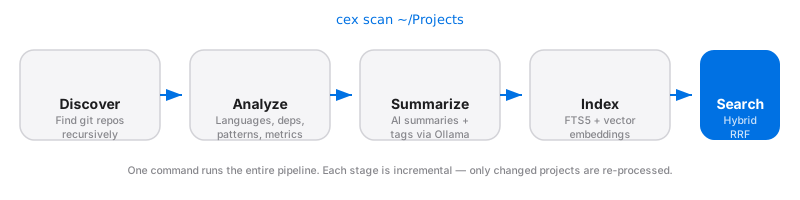
Each stage is incremental — only changed projects are re-processed on subsequent scans.
Try It
pip install code-explore
cex scan ~/Projects
cex search "REST API auth"
The search mode, fusion constant, and embedding model are all configurable via cex config. For details, see the GitHub repo.